
EA Help: AI-Powered Player Support
From Days to Minutes, Getting Players Back in the Game


Team
As part of the EA Help team within Worldwide Customer Experience (WWCE), I collaborated with product management, a technical program manager, engineering, two UX designers, and WWCE support operations.
Responsibilities
- End-to-end UX for EA Help v1, from information architecture to shipped UI
- Intent-based help model replacing the legacy category taxonomy
- Design principles for AI-assisted and agentic support
- Prototypes for the conversational agent and automated recovery flows
- Roadmap partnership with PM and engineering on a phased AI rollout
Overview
Help That Does the Work
EA Help is the player support platform for millions of players across 26+ EA titles. I led the design of v1, which shipped in January 2021 and replaced a maze of categories with intent-based help. This case study revisits it in 2026 with an AI layer that doesn't just find answers, but resolves issues on the player's behalf.
The Problem
Players could find help, but still did all the work
Before EA Help, players with a problem left the game, grabbed their phone, and searched Reddit. v1 brought them back to an official, personalized experience. But the effort of getting help didn't go away.
Take a missing player pack. Recovering it took days of back-and-forth:
The cost? An item EA's own systems could have verified in seconds took days to restore, while multi-day resolutions and repeat contacts clogged advisor queues.
v1 fixed navigation. It did not fix the effort of describing an issue, gathering proof, and waiting for a human to act.
I mapped the friction to four root causes:
- Translation burden. "My game keeps crashing" doesn't map to a category.
- Proof burden. Players gather evidence EA already has.
- Search misses. Keyword search succeeded only ~40% of the time.
- Lost context. Switching from web to chat meant explaining everything again.
Leading support teams now deploy AI agents that resolve, not route. v1 already exposes the entitlements, purchase history, account, and case APIs an agent needs. The missing piece is an experience that makes those actions safe, legible, and trustworthy to a player. That is a design problem first.
Design Approach
Earn the Right to Act
An AI that can change a player's account is powerful and risky. I framed the work around three requirements:
Trust and Transparency
Players see what the agent checks, why it suggests something, and exactly what will change before it changes.
Effort Near Zero
If EA knows it (games, platform, purchases), never ask for it.
A Human Is Always One Tap Away
And that human inherits the full story, so players never have to explain twice.
| Level | Agent may | Player sees | Examples |
|---|---|---|---|
L0Inform | Read and explain | Cited answer | Article answers, known-issue status, case status |
L1Suggest | Recommend a next step | Step card | Clear cache, update drivers, check NAT type |
Player confirms every change | |||
L2Act with confirm | Change the account after an explicit tap | Preview card + receipt | Restore missing content, refresh entitlements, reset cloud save |
A person decides | |||
L3Human required | Gather context and draft the case | Auto-drafted case + handoff | Refunds over threshold, bans, suspected compromise, chargebacks |
- L0Inform
- Agent may
- Read and explain
- Player sees
- Cited answer
- Examples
- Article answers, known-issue status, case status
- L1Suggest
- Agent may
- Recommend a next step
- Player sees
- Step card
- Examples
- Clear cache, update drivers, check NAT type
Player confirms every change - L2Act with confirm
- Agent may
- Change the account after an explicit tap
- Player sees
- Preview card + receipt
- Examples
- Restore missing content, refresh entitlements, reset cloud save
A person decides - L3Human required
- Agent may
- Gather context and draft the case
- Player sees
- Auto-drafted case + handoff
- Examples
- Refunds over threshold, bans, suspected compromise, chargebacks
Agent autonomy levels, from L0 Inform to L3 Human required
Key Design Principle: Autonomy is set by risk, not capability. Reading and explaining are automatic. Changing an account always needs a confirm tap. Anything high-risk goes to a person.
These principles guided the AI layer around 4 core features that work together as a complete player workflow.
Help Agent
Describe it your way
Players type, speak, or drop a screenshot of an error screen. The agent already knows their games, platform, and open cases. It shows short status lines ("Checking your Madden 26 purchases…") so waiting feels like progress.
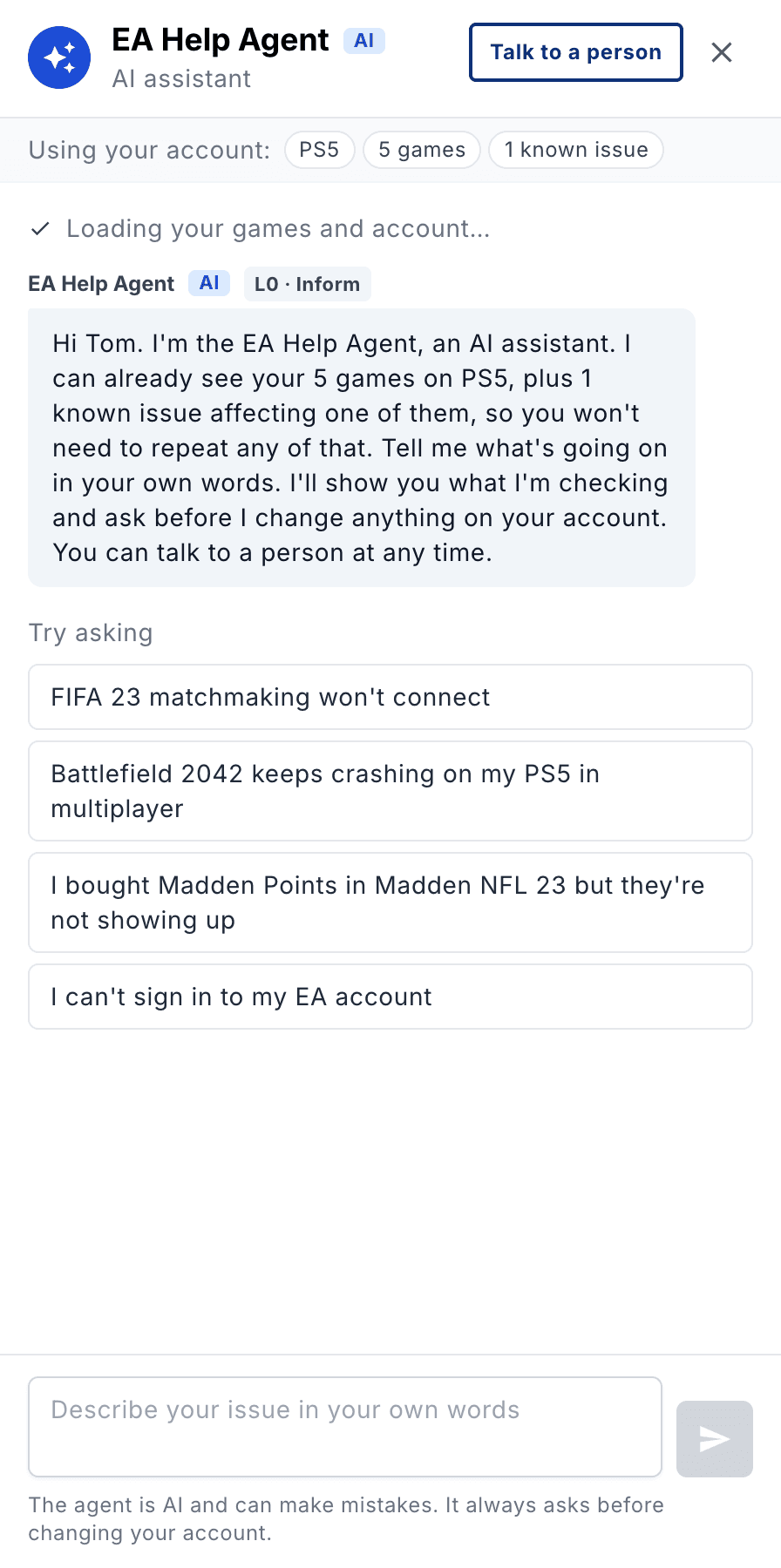
Context loads before the first reply
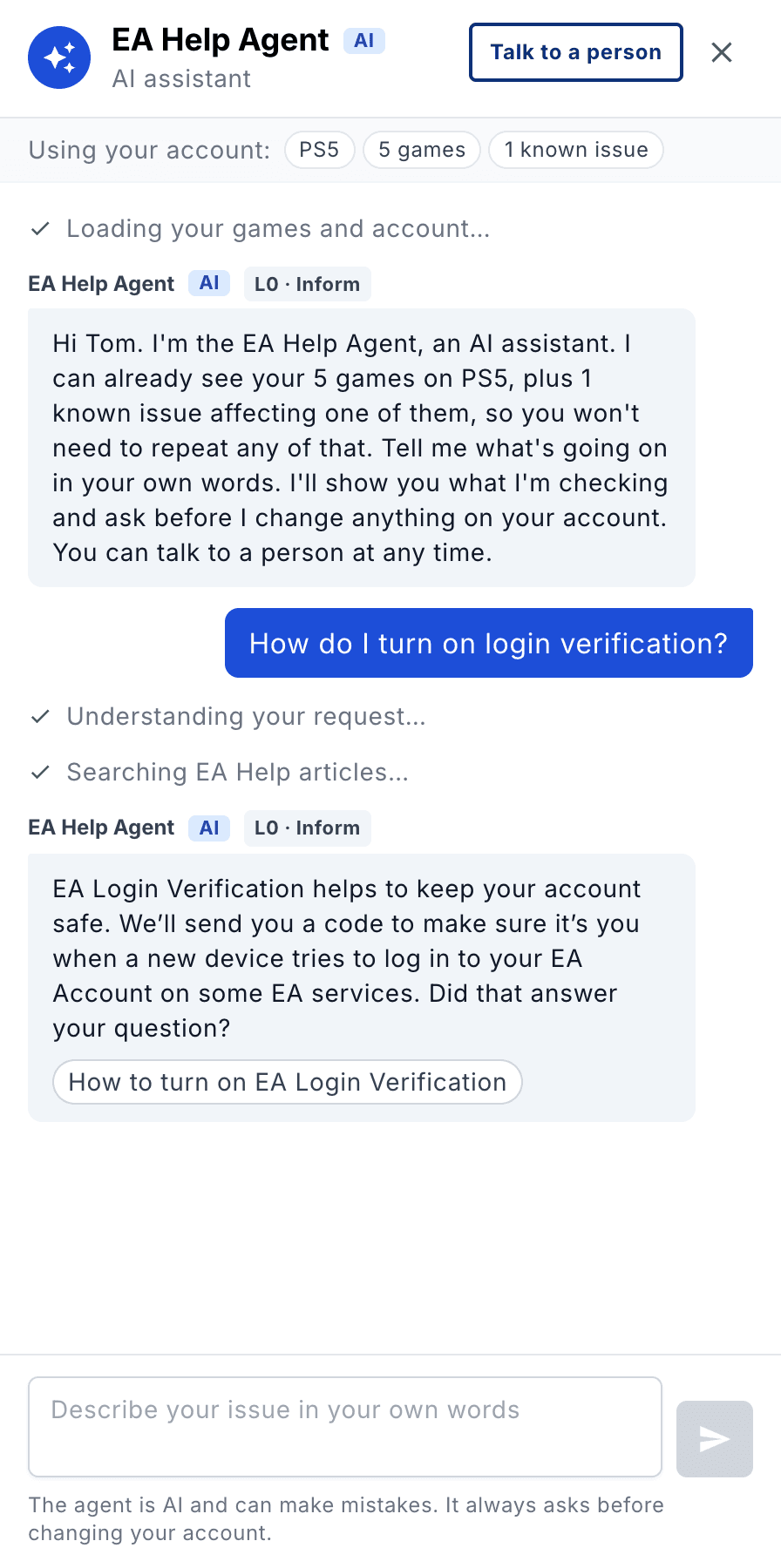
Visible reasoning and a cited answer
Key Capabilities
- Multimodal intake: text, voice, screenshots, and error codes
- Context pre-filled from the player's account
- Visible reasoning steps during tool calls
- An always-visible "Talk to a person"
Impact (Target)
60–70% of conversations resolved without a handoff.
Instant Content Recovery
No screenshots. No waiting.
Before, missing content took days and a stack of screenshots. Now the agent finds the transaction, confirms the item never arrived, and shows a restore card. One tap. Done. The receipt lands in My Cases.
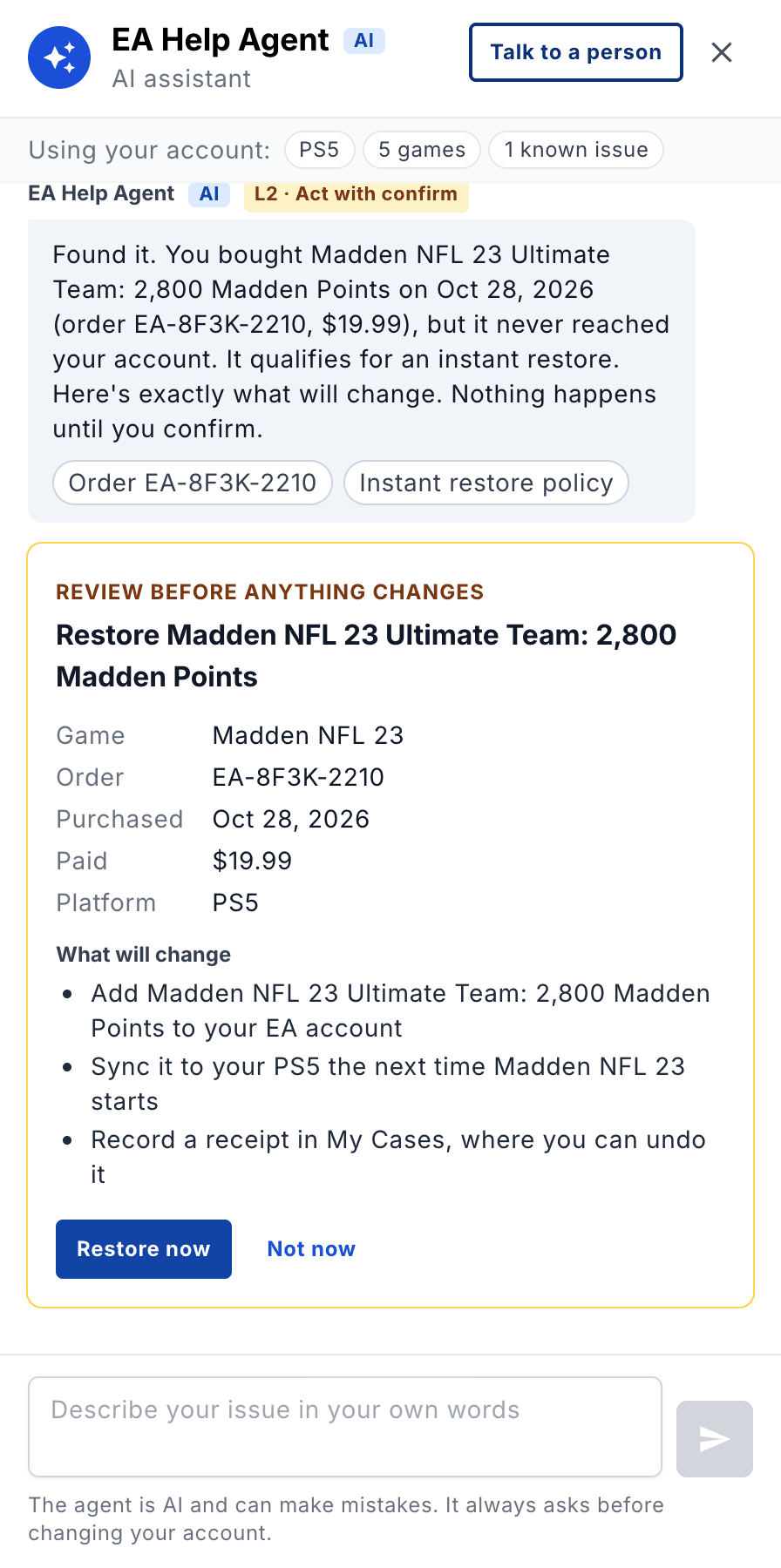
Preview before restore
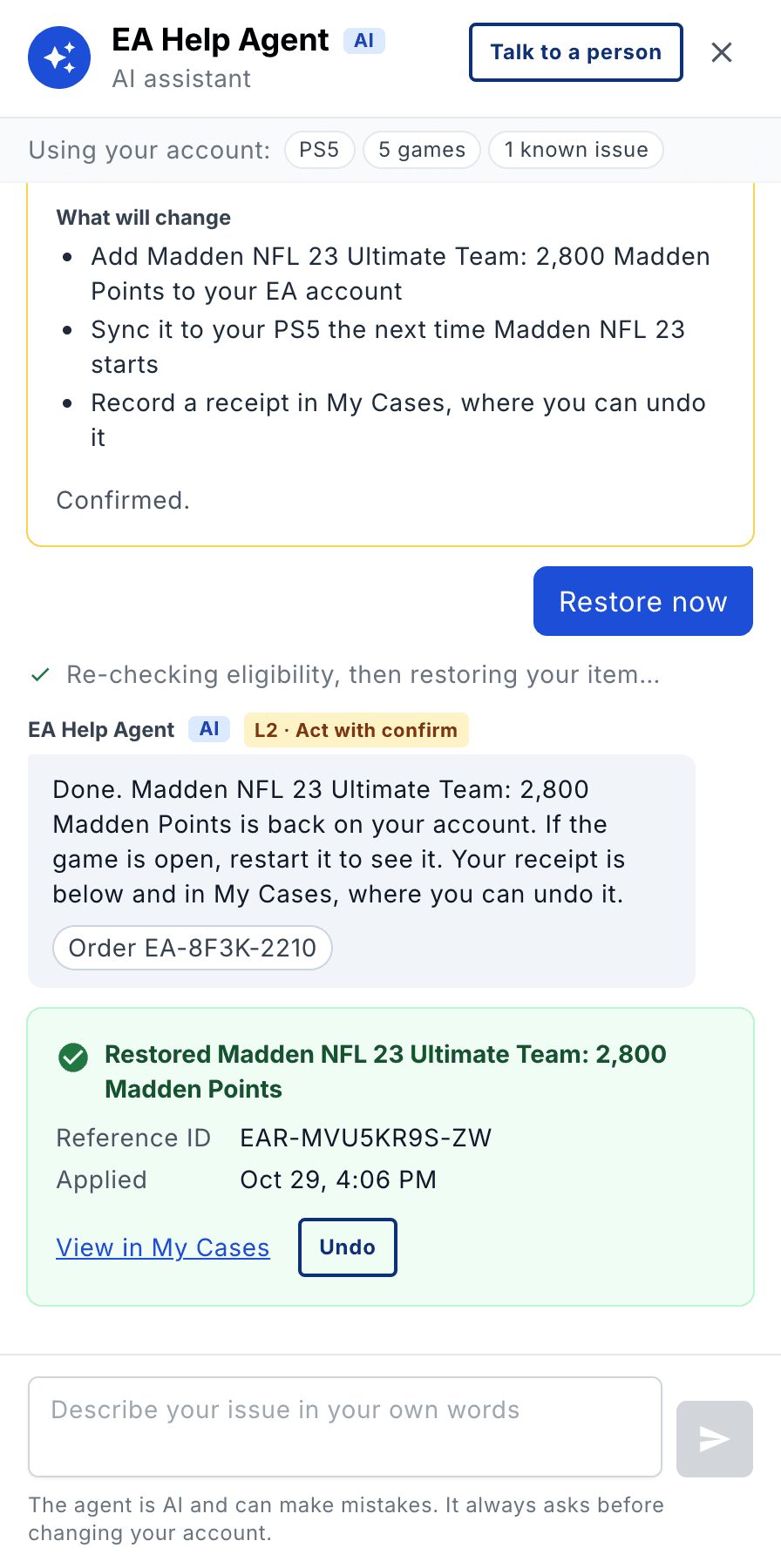
Receipt logged in My Cases
Key Capabilities
- Automated purchase and entitlement verification
- A rules-based eligibility engine decides what the agent may restore
- Preview-before-restore card with a full receipt
Impact (Target)
80% of eligible claims resolved in under 5 minutes.
Guided Diagnostics
Troubleshooting that knows your setup
Instead of generic articles, the agent asks two or three questions, then walks through steps written for the player's platform and game. Each step can branch on "That didn't work." If nothing fixes it, the case is created with the full diagnostic log.
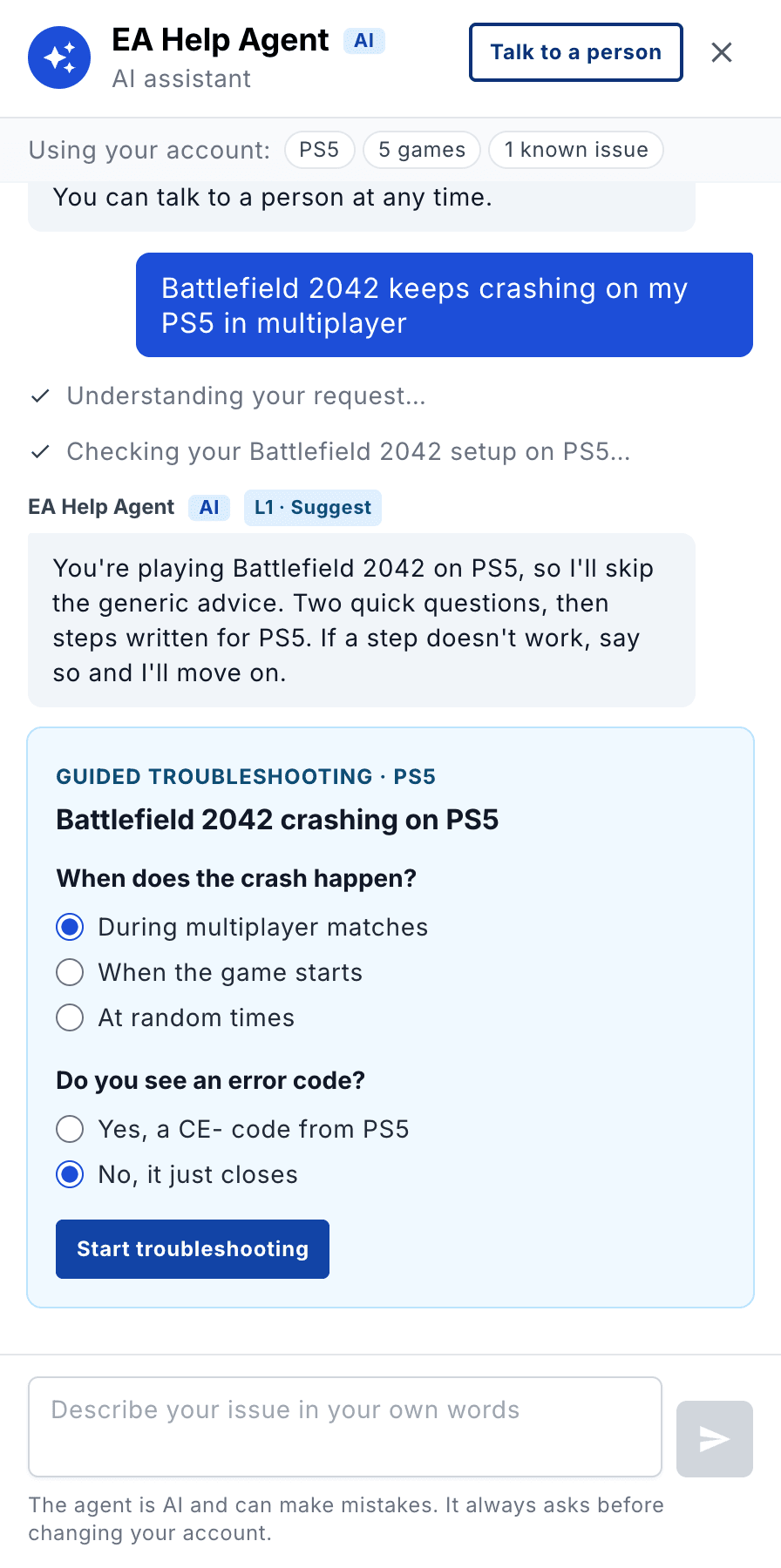
Two targeted questions first
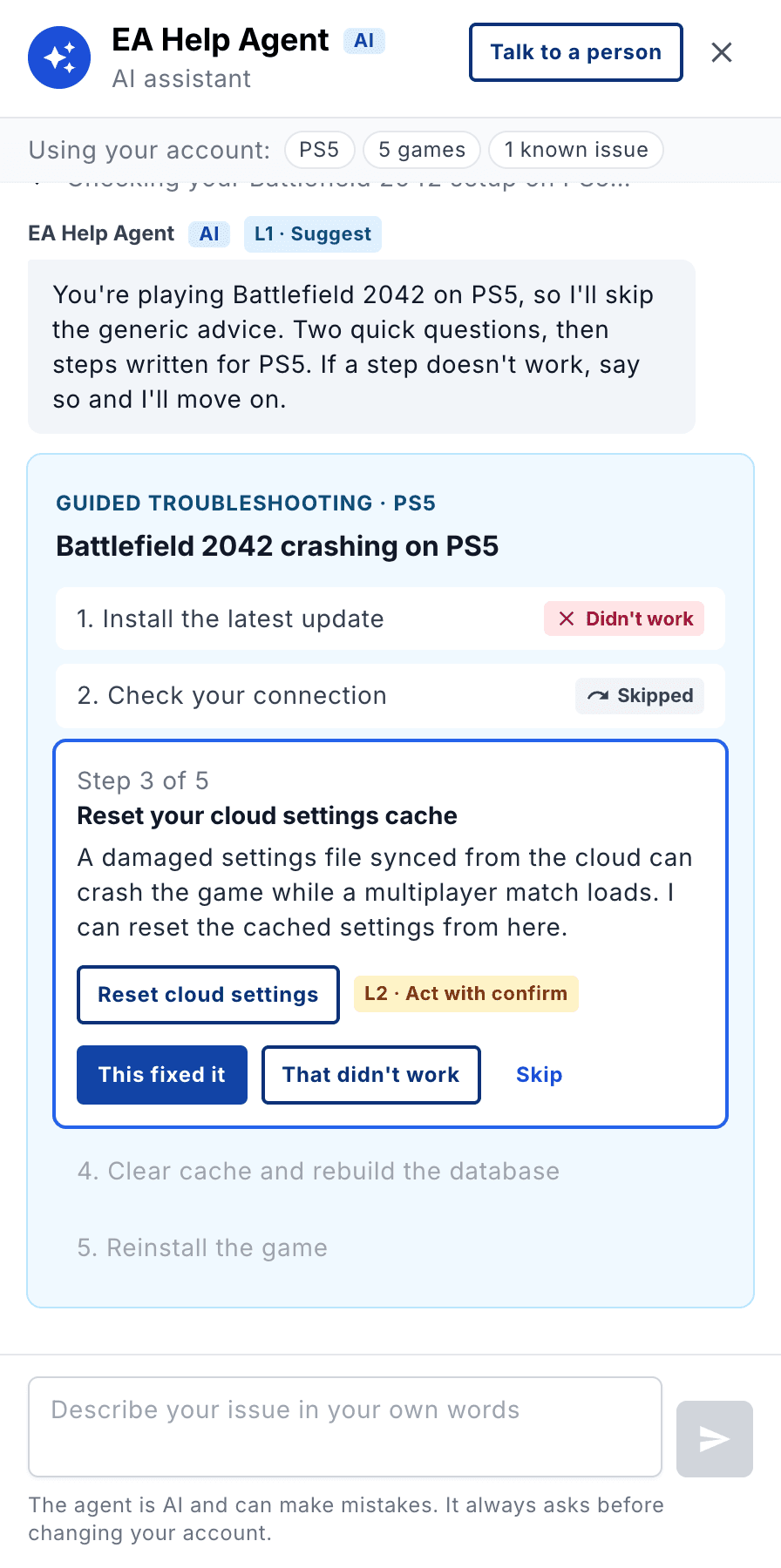
Step cards with branching and a one-click fix
Key Capabilities
- Adaptive paths through authored decision trees; the AI chooses the path but doesn't invent fixes
- Interactive step cards with branching
- A diagnostic log attached to every escalation
Impact (Target)
40% of technical issues resolved in self-service.
Living Cases
Cases that write themselves
When a human is needed, the agent drafts the case: the issue, evidence, steps tried, and a suggested next step. The player reviews it, sends it, and tracks it in plain language. The advisor picks up mid-story.
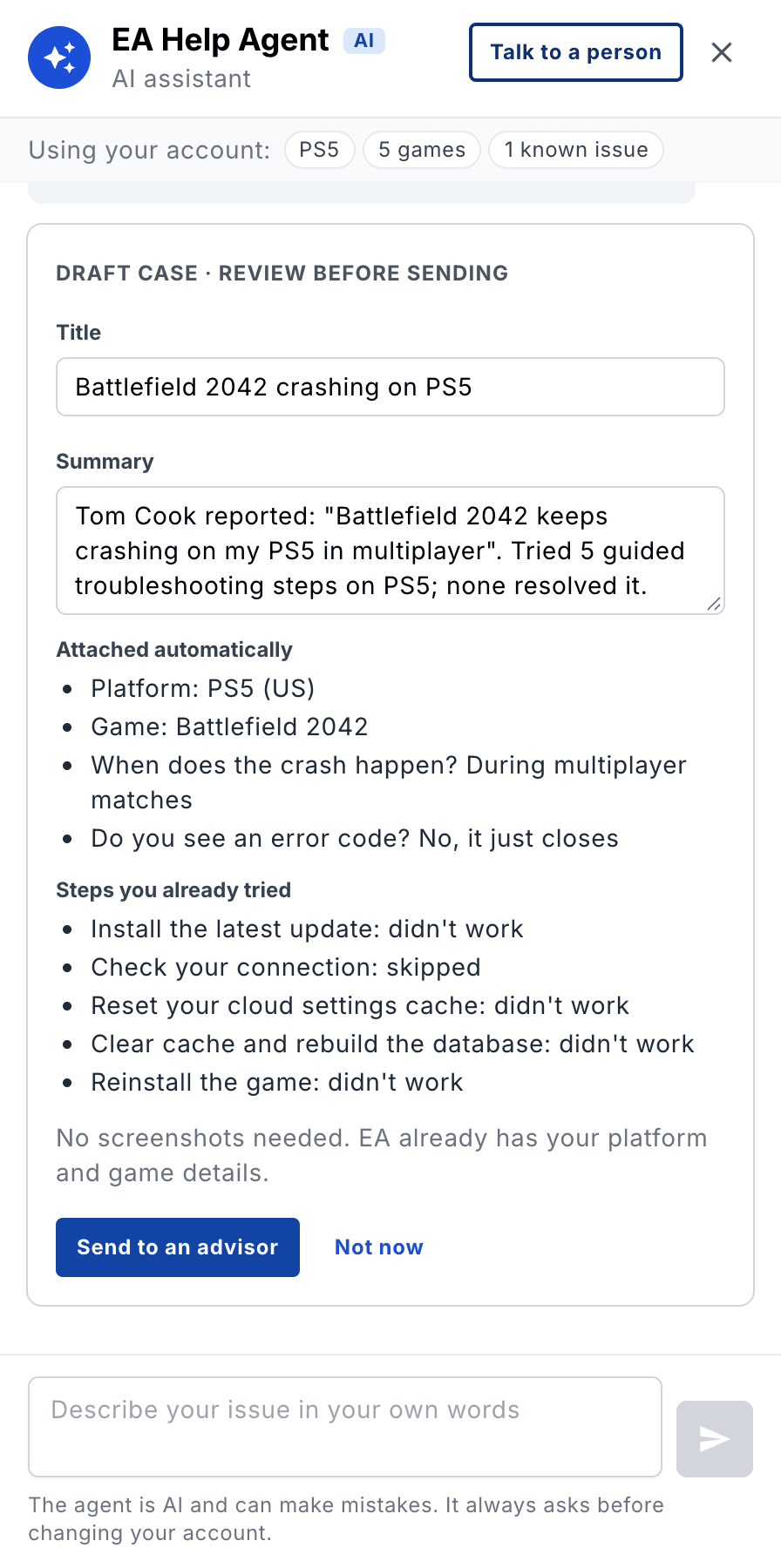
Auto-drafted case the player reviews
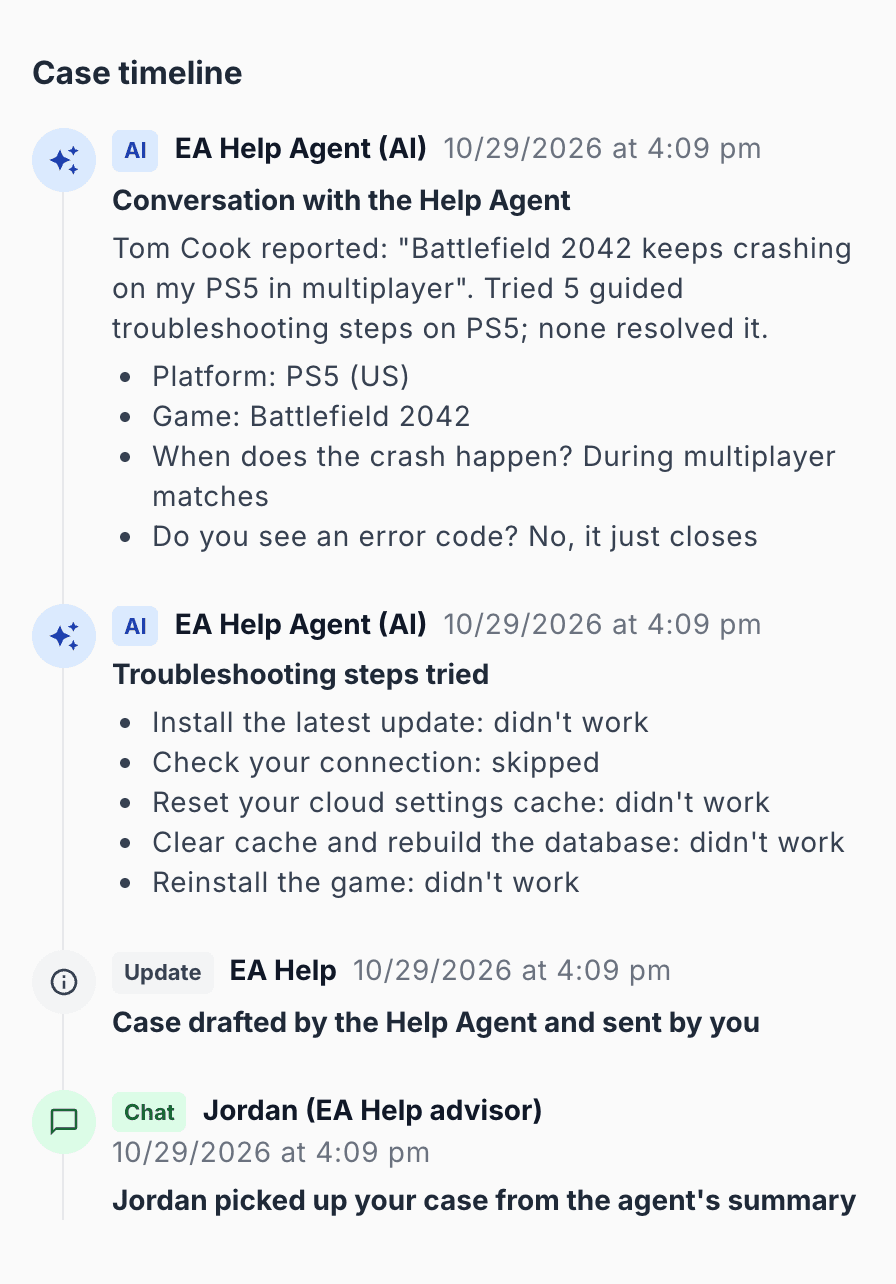
One timeline across AI and advisor chat
Key Capabilities
- Auto-drafted cases the player reviews before sending
- One timeline across AI, chat, and email
- Plain-language status with a predicted resolution time
Impact (Target)
First contact resolution of 80%+.
Complete Player Workflow
These features work together to support the complete support journey:
- ASK. The player describes the issue in their own words, or a known-issue banner answers before they ask.
- UNDERSTAND. The agent pulls context and confirms the issue.
- RESOLVE. It restores, diagnoses, or recovers, with the player confirming each change.
- HAND OFF. If needed, a human picks up with the full story.
From "something's wrong" to back in the game, without leaving the conversation.
Business Impact (Targets)
The AI layer is a design vision, so these are design targets set against industry benchmarks (Gartner, Forrester CX Index, COPC), not measured results.
Channel Shift
- •200,000+ contacts shifted each year from high-cost live channels to self-service
- •AI infrastructure cost offset by support savings within 18 months
Guardrails (Must Not Regress)
- •Wrongful action rate under 0.5%
- •No added time to reach a human
- •CSAT for AI-resolved issues within 5 points of human-resolved
Key Learnings
Finding help isn't the same as getting help. v1 solved navigation; the real effort was in proving, waiting, and repeating.
Trust is a UI problem. Showing what the agent checks and what it will change matters as much as model accuracy.
Autonomy should be earned in stages. Read-only first, then confirm-to-act, gated on real metrics.